About the user interface
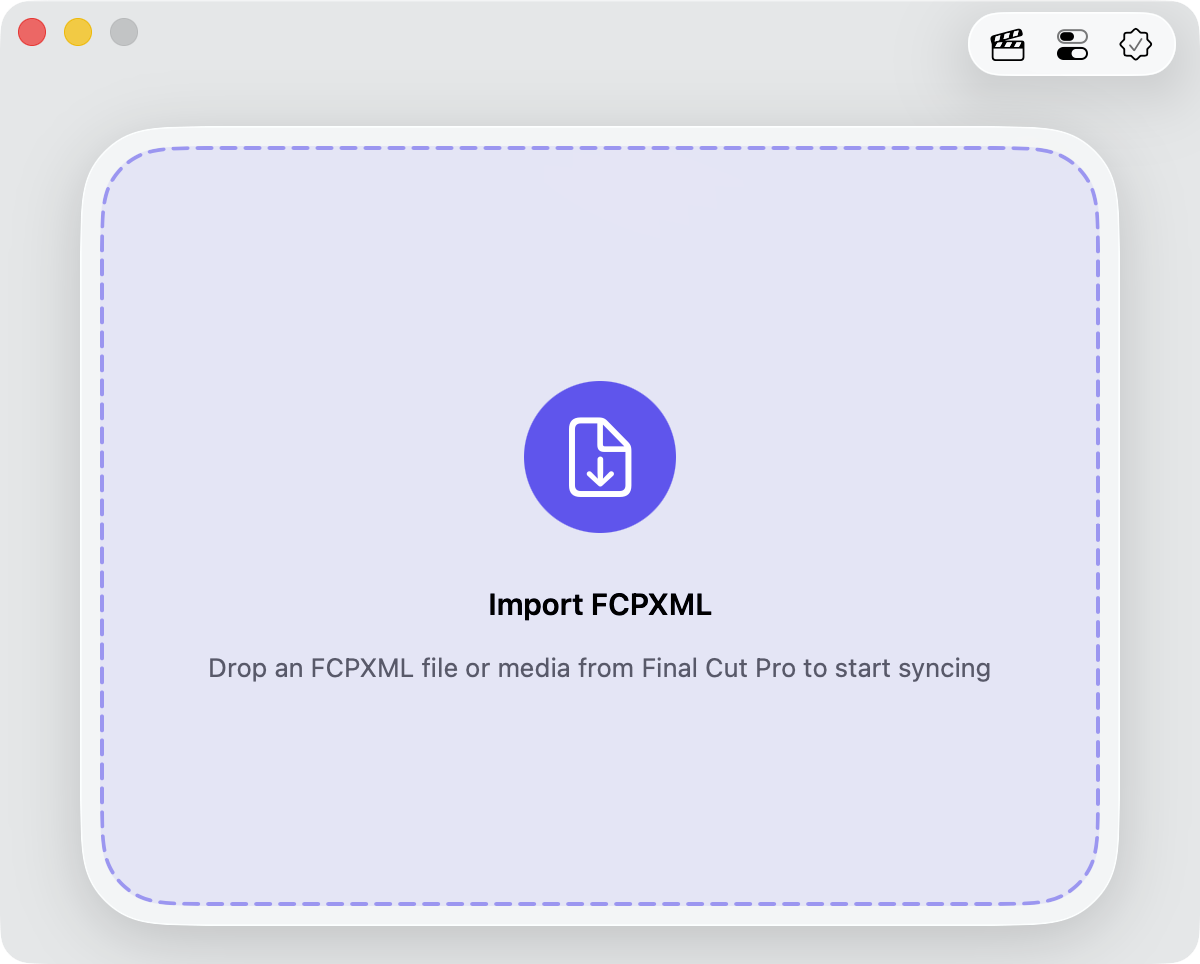
Media Sync Tool keeps a deliberately simple window: the whole window is a drop zone, with one compact control bar in the top-right corner.
Tip: Coming from version 1.x? The app was fully redesigned in 2.0—the old toolbar of buttons, including Auto Send, is gone. See What’s new in Media Sync Tool 2.0.
The drop zone
The main window is one large drop zone. To sync media, export your footage and external audio from Final Cut Pro as an FCPXML file, then drag that file onto the window to start the sync. In Final Cut Pro you can also drag events, individual clips, or an entire library straight into the window—Media Sync Tool reads the same FCPXML behind the scenes. In the standalone app you can instead click the import badge in the centre of the window to browse for an FCPXML file.
Tip: The most reliable way to produce a complete FCPXML with all essential metadata is by using the dedicated Media Sync Tool metadata view in Final Cut Pro.
The control bar
The Control Bar content depends on where you are in the view route.

On the drop zone it’s a three-part navigator that opens the app’s other screens:

 —to show those notes will be applied to the next sync, until you clear them.


Subscription status at a glance
The Subscription button changes its icon to show where your purchase or subscription stands. Click it any time to review the details or manage your plan.
 Needs attention — the subscription isn’t active and needs renewing, or the app hasn’t been purchased.