Purchase status
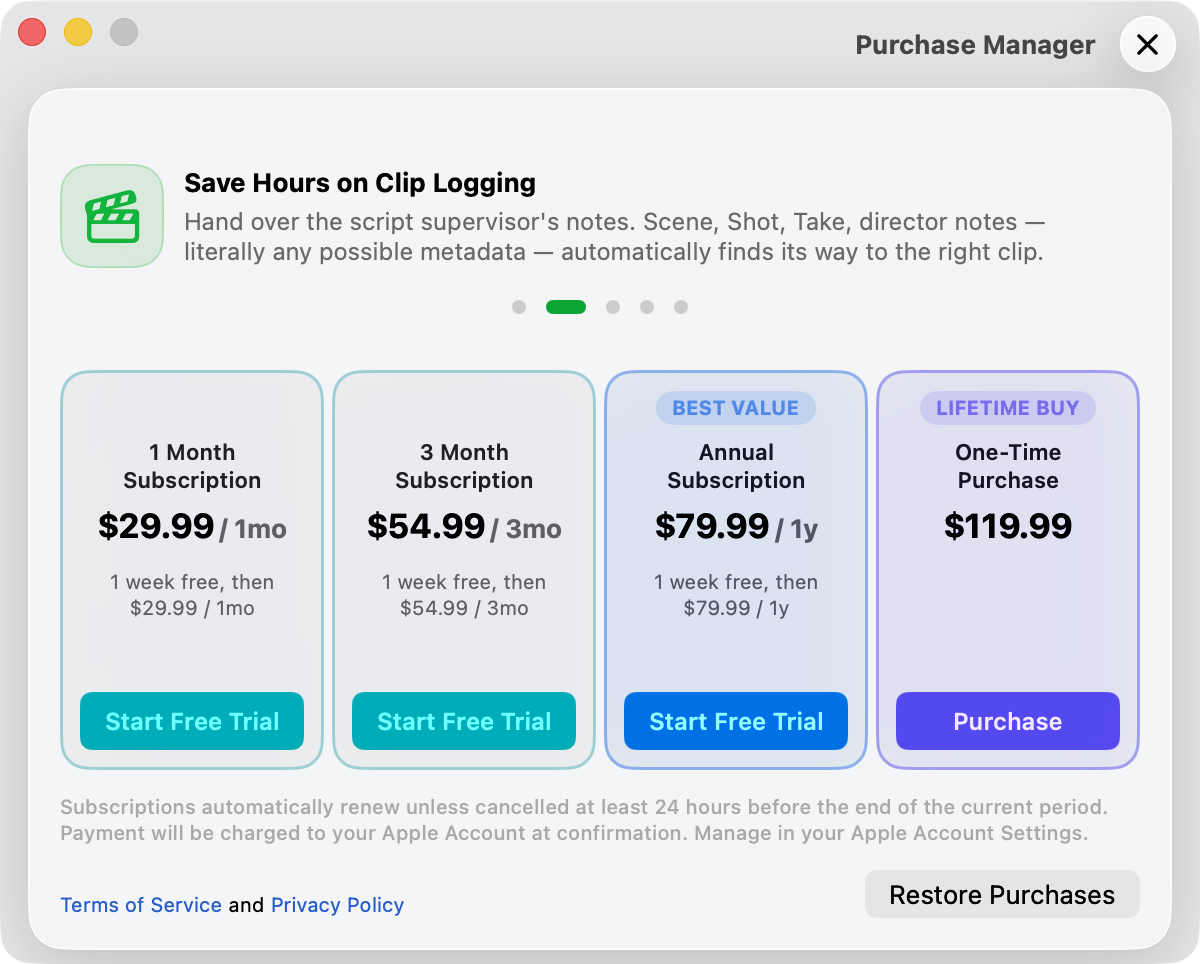
Media Sync Tool offers several ways to pay—recurring subscriptions or a single one-time purchase—so you can match the plan to how often you work.
Choose a plan
Different productions and editors have different needs, so Media Sync Tool gives you a choice of purchase options. You can subscribe on a monthly, quarterly, or yearly basis, or make a one-time purchase to unlock the app permanently with no future charges.
To open the Purchase management view, click the Purchase Manager button (the seal icon) in the control bar at the top-right of the main window.
Note: You can’t open the Purchase management view from the Final Cut Pro extension. You need to use the main application to start, renew, or change a subscription, or to make a one-time purchase.
What a purchase unlocks
Until you subscribe or make a one-time purchase, Media Sync Tool can’t sync or export media. The rest of the app—loading clips, reviewing settings, and exploring the interface—remains available so you can see how everything works before you commit.
Your active plan
Once you subscribe or buy, your active plan’s card is outlined in green and its button reads Subscribed for a subscription, or Purchased for the one-time buy. During a free trial the button reads Free Trial Mode. A subscription card also shows when it next renews—a “Renews on” date—or, if you’ve canceled, the date your access ends.
You can still change plans while subscribed: a longer subscription, or the one-time purchase, stays available to buy as an upgrade, while shorter or equivalent plans appear dimmed. A confirmation appears after a successful purchase or subscription.
- Manage Subscription
- Opens your Apple account’s subscription settings, where you can change tier or turn off auto-renewal. Shown only while a subscription is active.
- Restore Purchases
- Re-checks your Apple account and restores a purchase made on another device or after reinstalling. Media Sync Tool tells you whether anything was restored.
If a purchase or restore fails: Media Sync Tool shows a Subscription Error with the reason reported by the App Store. Your existing access isn’t affected—try again once the issue is resolved.